- JavaScript 80.5%
- HTML 7.5%
- CSS 7.4%
- Python 3.9%
- Dockerfile 0.7%
 esetheyers
9489f41c1f Same program as 1.1.1. The store already called its previous release 1.1.1 while it ran the 1.1.0 image, so Umbrel needs a new number to offer the update. |
||
|---|---|---|
| .github/workflows | ||
| docs | ||
| src | ||
| .gitignore | ||
| icon.svg | ||
| LICENSE | ||
| README.md | ||
| render-icon.py | ||


Alby Automation
Forward your Lightning sats automatically, without having to remember.
An app for Umbrel that sends fixed payments from your Alby Hub wallet to a list of Lightning Addresses whenever the balance rises above a threshold.
En español: una app para Umbrel que reparte sola lo que entra en tu Alby Hub. Cuando el saldo pasa de un umbral, manda una cantidad fija a cada dirección Lightning de tu lista. Se configura desde su propia página, sin tocar ficheros.
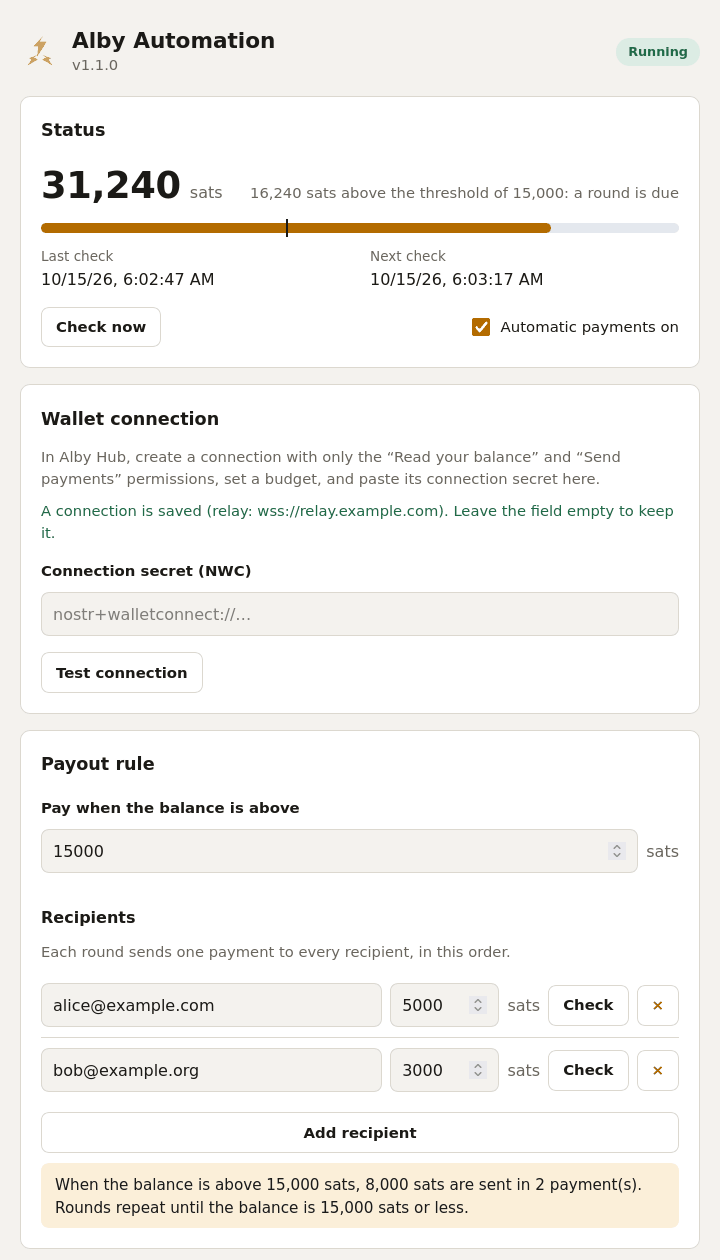
Made for
- a node that keeps receiving small payments (mining payouts, tips, routing fees) and should pass them on;
- splitting what comes in between several people or wallets, always in the same proportions;
- keeping a hot wallet small by sweeping it to somewhere safer.
Install on Umbrel
- In Alby Hub, create a connection for this app with only two
permissions, read your balance and send payments, and a monthly
budget that covers the rounds you expect and no more. Copy the connection
secret (
nostr+walletconnect://…). - In Umbrel, open App Store → ⋯ → Community App Stores, add
https://git.huveme.com/esetheyers/umbrel-appsand install Alby Automation. - Open the app, paste the secret, press Test connection, set the threshold and the recipients, and save.
Nothing is paid until a complete configuration is saved. Each recipient has a Check button that asks its server whether the address exists and which amounts it accepts, and the switch Automatic payments on pauses everything without losing the settings.
How it works
Every few minutes the app reads the balance. If it is above the threshold, it pays every recipient once, in order: that is a round.
- Nobody is paid twice while somebody else waits. If one payment fails, the round stays pending and only that payment is retried, on every check, until it goes through.
- Large balances are drained in steps. After a round it looks again; if the balance is still above the threshold, another round follows.
- Optional Telegram alerts when a payment fails, or when the wallet has not answered for several checks in a row (three by default, so short relay hiccups stay quiet). Create a bot with @BotFather and paste its token and your chat id under Alerts.
Things worth knowing
- Who can open the page. The app has no login of its own. On Umbrel it sits behind Umbrel's app proxy, which only lets the logged-in owner through. If you run the container elsewhere, do not publish port 3000: put something with authentication in front of it.
- Secrets. The connection secret and the bot token are stored in
config.json(readable only by its owner) and are never sent back to the browser: the page only shows that one is saved. To replace one, type the new value; leaving the field empty keeps the old one. - Where the data is. In the app's data folder,
~/umbrel/app-data/esetheyers-alby-automation/data/:config.json(settings),state.json(the pending round) andhistory.json(the last 200 payments). It survives app updates and umbrelOS upgrades. - A round that can never finish. If a recipient is gone for good, the status card offers Discard this round. Payments already made in that round are not undone.
- Changing recipients mid-round. A pending round keeps the recipients it started with; the new ones apply from the next round.
- Threshold lower than a round. If one round costs more than the threshold, balances in between send nothing. The page warns about it.
- Not only Alby Hub. Any wallet that speaks NWC with
get_balanceandpay_invoiceshould work; only Alby Hub has been used.
Upgrading from 1.0.x
From 1.1.0 the app is installed from a different store,
https://git.huveme.com/esetheyers/umbrel-apps, and its id changed from
claudecode-alby-automation to esetheyers-alby-automation, so Umbrel sees
it as a different app. Do it in this order, so the two never run at the
same time on the same wallet:
- Add the new store and install the app from it. With no settings it does nothing.
- Stop the old app from the Umbrel home screen.
- Copy your settings (and a pending round, if there is one) across:
sudo cp ~/umbrel/app-data/claudecode-alby-automation/data/*.json ~/umbrel/app-data/esetheyers-alby-automation/data/ && sudo chown 1000:1000 ~/umbrel/app-data/esetheyers-alby-automation/data/*.json && sudo chmod 600 ~/umbrel/app-data/esetheyers-alby-automation/data/config.json
- Open the new app: within a minute it shows your settings and the balance.
- Uninstall the old app and remove the old store.
An existing config.json is read as it is, and saving from the page keeps the
same format. Alerts are in English by default from 1.1.0; pick
Spanish under Alerts to have them as before.
Development
cd src
npm test                 # node --test, no network and no wallet needed
npm run dev              # the page with a pretend wallet, http://127.0.0.1:3000
The image is built for both architectures and pushed by hand:
cd src
docker buildx build --platform linux/amd64,linux/arm64 \
  -t docker.io/esetheyers/alby-automation:1.1.2 --push .
Layout: src/ is the program (lib/engine.js is the payout loop,
lib/server.js the web interface, public/ the page). What Umbrel reads
(manifest and docker-compose.yml) lives in the store repository,
esetheyers/umbrel-apps.
Support the project
If the app saves you time, you can send a few sats to

esetheyers@huveme.com
Type it into your wallet as it is: it works as a Lightning Address and, in wallets that support BIP 353, also as a BOLT12 offer or a silent payment address. Thank you.
Contact
- Bugs and ideas: write to esetheyers@huveme.com and I will add it to the issues, where you can see the known ones. Please leave out your connection secret, bot token and addresses.
- Anything else: esetheyers@huveme.com
(PGP key
3648 41BA B31F 9D0F 3D07 5629 C34F 1F5D 7116 CA10, at keys.openpgp.org).
License
MIT. Use at your own risk: this software moves real money on your behalf.