
# Alby Automation **Forward your Lightning sats automatically, without having to remember.** An app for [Umbrel](https://umbrel.com) that sends fixed payments from your Alby Hub wallet to a list of Lightning Addresses whenever the balance rises above a threshold. [Install](#install-on-umbrel) · [How it works](#how-it-works) · [Support the project](#support-the-project) · [Contact](#contact)
> **En español:** una app para Umbrel que reparte sola lo que entra en tu > Alby Hub. Cuando el saldo pasa de un umbral, manda una cantidad fija a cada > dirección Lightning de tu lista. Se configura desde su propia página, sin > tocar ficheros.
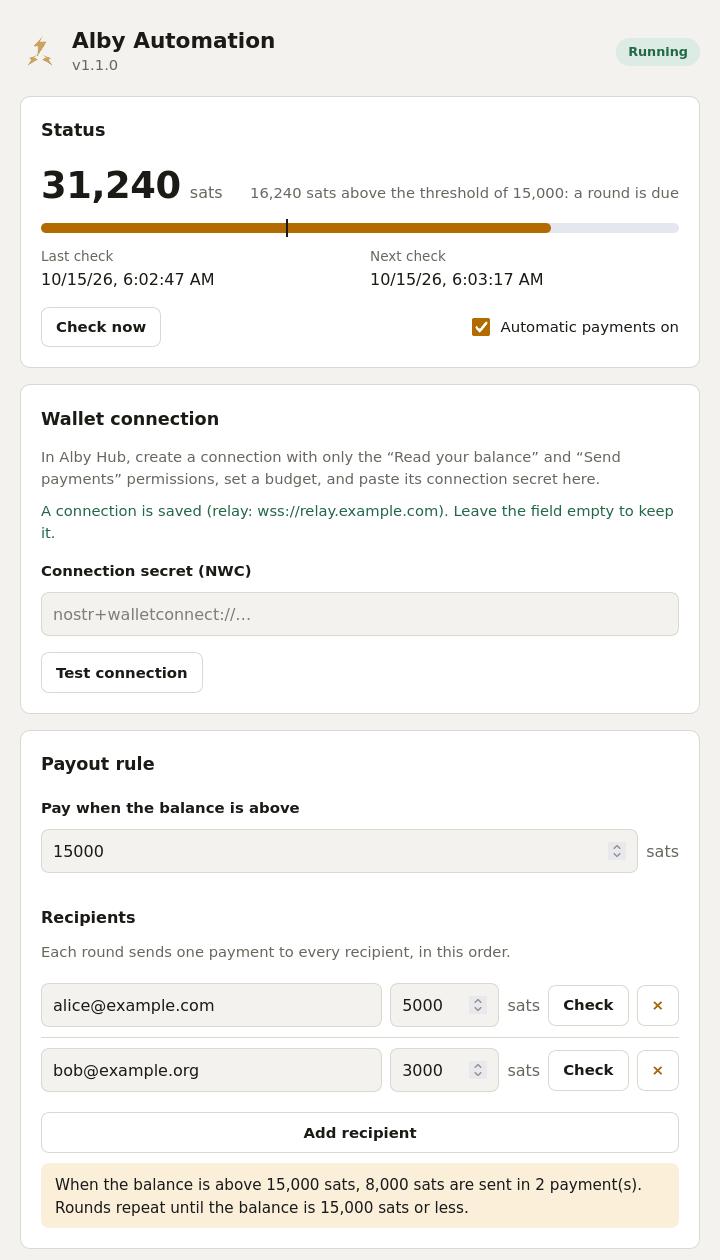
The app's page: balance above the threshold, payout rule and two recipients

## Made for - a node that keeps receiving small payments (mining payouts, tips, routing fees) and should pass them on; - splitting what comes in between several people or wallets, always in the same proportions; - keeping a hot wallet small by sweeping it to somewhere safer. ## Install on Umbrel 1. **In Alby Hub**, create a connection for this app with only two permissions, **read your balance** and **send payments**, and a monthly budget that covers the rounds you expect and no more. Copy the connection secret (`nostr+walletconnect://…`). 2. **In Umbrel**, open **App Store → ⋯ → Community App Stores**, add `https://git.huveme.com/esetheyers/umbrel-apps` and install **Alby Automation**. 3. **Open the app**, paste the secret, press **Test connection**, set the threshold and the recipients, and save. Nothing is paid until a complete configuration is saved. Each recipient has a **Check** button that asks its server whether the address exists and which amounts it accepts, and the switch **Automatic payments on** pauses everything without losing the settings. ## How it works Every few minutes the app reads the balance. If it is **above the threshold**, it pays every recipient once, in order: that is a *round*. - **Nobody is paid twice while somebody else waits.** If one payment fails, the round stays pending and only that payment is retried, on every check, until it goes through. - **Large balances are drained in steps.** After a round it looks again; if the balance is still above the threshold, another round follows. - **Optional Telegram alerts** when a payment fails, or when the wallet has not answered for several checks in a row (three by default, so short relay hiccups stay quiet). Create a bot with [@BotFather](https://t.me/BotFather) and paste its token and your chat id under **Alerts**.
Things worth knowing - **Who can open the page.** The app has no login of its own. On Umbrel it sits behind Umbrel's app proxy, which only lets the logged-in owner through. If you run the container elsewhere, do not publish port 3000: put something with authentication in front of it. - **Secrets.** The connection secret and the bot token are stored in `config.json` (readable only by its owner) and are never sent back to the browser: the page only shows that one is saved. To replace one, type the new value; leaving the field empty keeps the old one. - **Where the data is.** In the app's data folder, `~/umbrel/app-data/esetheyers-alby-automation/data/`: `config.json` (settings), `state.json` (the pending round) and `history.json` (the last 200 payments). It survives app updates and umbrelOS upgrades. - **A round that can never finish.** If a recipient is gone for good, the status card offers **Discard this round**. Payments already made in that round are not undone. - **Changing recipients mid-round.** A pending round keeps the recipients it started with; the new ones apply from the next round. - **Threshold lower than a round.** If one round costs more than the threshold, balances in between send nothing. The page warns about it. - **Not only Alby Hub.** Any wallet that speaks NWC with `get_balance` and `pay_invoice` should work; only Alby Hub has been used.
Upgrading from 1.0.x From 1.1.0 the app is installed from a different store, `https://git.huveme.com/esetheyers/umbrel-apps`, and its id changed from `claudecode-alby-automation` to `esetheyers-alby-automation`, so Umbrel sees it as a different app. Do it in this order, so the two never run at the same time on the same wallet: 1. Add the new store and install the app from it. With no settings it does nothing. 2. **Stop the old app** from the Umbrel home screen. 3. Copy your settings (and a pending round, if there is one) across: ``` sudo cp ~/umbrel/app-data/claudecode-alby-automation/data/*.json ~/umbrel/app-data/esetheyers-alby-automation/data/ && sudo chown 1000:1000 ~/umbrel/app-data/esetheyers-alby-automation/data/*.json && sudo chmod 600 ~/umbrel/app-data/esetheyers-alby-automation/data/config.json ``` 4. Open the new app: within a minute it shows your settings and the balance. 5. Uninstall the old app and remove the old store. An existing `config.json` is read as it is, and saving from the page keeps the same format. Alerts are in English by default from 1.1.0; pick Spanish under **Alerts** to have them as before.
Development ``` cd src npm test # node --test, no network and no wallet needed npm run dev # the page with a pretend wallet, http://127.0.0.1:3000 ``` The image is built for both architectures and pushed by hand: ``` cd src docker buildx build --platform linux/amd64,linux/arm64 \ -t docker.io/esetheyers/alby-automation:1.1.2 --push . ``` Layout: `src/` is the program (`lib/engine.js` is the payout loop, `lib/server.js` the web interface, `public/` the page). What Umbrel reads (manifest and `docker-compose.yml`) lives in the store repository, [esetheyers/umbrel-apps](https://git.huveme.com/esetheyers/umbrel-apps).
## Support the project If the app saves you time, you can send a few sats to

QR code for esetheyers@huveme.com
esetheyers@huveme.com

Type it into your wallet as it is: it works as a Lightning Address and, in wallets that support BIP 353, also as a BOLT12 offer or a silent payment address. Thank you. ## Contact - **Bugs and ideas:** write to esetheyers@huveme.com and I will add it to the [issues](https://git.huveme.com/esetheyers/alby-automation-umbrel/issues), where you can see the known ones. Please leave out your connection secret, bot token and addresses. - **Anything else:** esetheyers@huveme.com (PGP key `3648 41BA B31F 9D0F 3D07 5629 C34F 1F5D 7116 CA10`, at [keys.openpgp.org](https://keys.openpgp.org/search?q=esetheyers%40huveme.com)). ## License MIT. Use at your own risk: this software moves real money on your behalf.